
By Edy Werder — IT Consultant & Tech Blogger
Mini PCs are changing the game for home labs and small business servers. Most guides just list the specs, but they rarely explain why these small machines are so good for running servers.
I really like these small machines and use them for several of my own projects. For me, it’s important to have something compact and quiet. They’re also energy efficient and more powerful than you might expect.
In this guide, I’ll go over what makes a mini PC great for server use, what to look for when choosing one, and the best models you can get in 2026 for different needs and budgets.
Editor’s Note (Updated February, 2026):
This guide was initially published in early 2024 and has been significantly updated. I’ve expanded it to include small business use cases, added new recommendations, and improved the structure based on real-world testing and feedback. It’s now better aligned for home labs and compact business server setups.
Best Overall: Minisforum MS-01
- Intel Core i9-13900H processor
- Supports up to 64GB DDR5 RAM
- Dual M.2 NVMe SSD slots
- Works great with Proxmox and ESXi
Best Value: Acemagic K1 or Beelink SER8
- Excellent performance for the price
- Good for home server tasks
- Energy efficient
Need Help Choosing? Jump to the full comparison section below.
Mini PC vs. Traditional Server: What It Is and Why I Like It
A mini PC is a full desktop computer packed into a box about the size of a paperback book. You still need your own display, keyboard, and mouse. But once it’s running, it behaves like any other Windows or Linux PC.
For a home lab or a small business server, the form factor is the real win. Mini PCs are smaller than traditional servers, making them ideal for space-constrained environments.
Mini PCs consume less power than traditional servers, which benefits long-term operational costs. That matters if you run it 24/7. Low power consumption also means less heat, and that usually means less noise.
Performance is usually “more than enough” for the typical server jobs people run at home. File sharing, backups, Home Assistant, a small Docker stack, Plex, AdGuard, Pi-hole, or a small web server. All of that runs great on x86 mini PCs. And because they are x86, you get broad compatibility. Most software and hypervisors are built for it.
Mini PCs often come with pre-installed storage and memory, simplifying the setup process for users. You unbox it, install your OS, and you’re off. If you need more later, upgrades are often easy. Many units let you add RAM or swap the SSD without drama.
And then there’s the price. A mini PC is often cheaper than a “real” server. That makes them a very practical option for homelabers and small businesses.
What to look for when buying a Mini PC server?
1) CPU: performance is nice, efficiency is the goal
For a 24/7 mini server, I care more about idle watts and sustained efficiency than peak benchmark scores. The CPU still needs enough headroom for your workload. File sharing, backups, and a few Docker apps are easy. Multiple VMs, Plex transcoding, and heavier databases are not.
Important Aspects I review
- How low it can idle (real-world reviews matter more than specs)
- How it behaves under sustained load (heat and fan noise)
- Whether it supports virtualization features (AMD-V or Intel VT-x/VT-d)
My recommendation
- For most home and small-business use, pick a modern, efficient x86 CPU and avoid overbuying.
- For high-end compact “workstation mini PCs,” chips like the Intel Core Ultra 7 258V exist and are designed for efficiency, with 8 cores and low base power.
- AMD’s Ryzen AI Max+ PRO line can also be very high-end (up to 16 cores on the PRO 395). These are overkill for many home servers, but great for heavy virtualization in a compact box.
High-core-count Ryzen CPUs are often the best value for running virtualization workloads on mini PCs.
(Quick reality check: those “AI” chips are mainly found in premium compact PCs and laptops, not the average budget mini PC.)
2) Form factor: small is good, but cooling still matters
Mini PCs are great because they disappear. But physics does not. Tiny cases can get loud under load.
Important Aspects I review
- Airflow and fan quality (a quiet fan beats a tiny screamer)
- Room for upgrades (at least one extra SSD slot is a big plus)
My recommendation
Pick a model with a reputation for quiet cooling and a bit of internal space. Fanless is nice, but only if performance and thermals stay stable.
3) Storage and RAM: This is where “cheap” becomes expensive
Storage and RAM are the parts that decide how “server-like” your mini PC feels. Ideal mini PCs for homelabs support RAM upgrades and have efficient cooling systems for 24/7 operation.
Storage
- NVMe for the OS and VMs. Fast. Snappy. Worth it.
- 2.5-inch SATA drives are still useful for bulk storage if the case supports them.
RAM
- 16 GB is my minimum for a serious mini server.
- 32 to 64 GB makes sense for Proxmox and multiple VMs.
My recommendation
- 1 TB NVMe for the system and VMs
- Plus either a second NVMe or a 2.5-inch SATA SSD or HDD for bulk data
- 16 GB minimum, 32 to 64 GB if you virtualize a lot
And yes, two M.2 slots are becoming more common, which is perfect for this use case.
4) Connectivity: don’t buy yourself a future bottleneck
Ports decide how flexible the box is in a year.
Networking capabilities, such as 2.5 GbE or 10 GbE support, are increasingly common in modern mini PCs.
Important Aspects I review
- At least 2.5 GbE if I move large files often
- Enough USB ports for backup drives and install media
- USB-C is a bonus, Thunderbolt is “nice to have” for expansion
My recommendation
Minimum I like:
- 2.5 GbE (or better)
- 3x USB-A (USB 3.2)
- 1x USB-C
- 1x HDMI or DisplayPort (I do not need two for a server, but it’s fine)
5) Price in 2026: plan for RAM and SSD costs
In 2026, the “real” mini PC price is often what you add later. Memory and NAND pricing has been volatile, and industry trackers have been calling out sharp increases.
My recommendation
Best value tends to be:
- Barebones (you bring your own RAM and SSD when you find a deal)
- Bundles only if the included parts are actually priced well
- Refurb business minis (HP, Dell, Lenovo) if you want easy parts sourcing

6) Upgrades and flexibility: read the fine print
Some mini PCs look upgradeable, then you discover one slot is missing, or everything is glued down.
Important Aspects I review
- RAM type and maximum supported capacity
- Number of M.2 slots
- Whether it supports a 2.5-inch drive, and the allowed drive height
My recommendation
If you want maximum flexibility, I still like barebones. You control the parts and you can upgrade later without replacing the whole unit.
7) Cloud vs home server: why keep it on-prem?
A home server gives you control. It can also be faster on your LAN than any cloud drive.
My recommendation
Keep sensitive files and backups at home. Use cloud as a second copy, not your only copy.
8) OS choice: pick the one that matches your workload
Here’s how I think about it:
- Proxmox VE is my go-to for homelabs. Great for VMs and containers on one box.
- VMware ESXi can be excellent, but mini PCs often use Realtek NICs, and that can be annoying. There are community drivers, but it’s not the same as official support.
- Debian or Ubuntu Server is the simplest “always-on Docker box” route.
- Windows Server makes sense when you need AD or Windows-only apps.
Mini PC for Self-Hosting: Run Your Own Services at Home
Mini PCs are ideal for self-hosting projects. Thanks to their low power consumption, compact size, and surprisingly strong performance, you can run various services on your own hardware, without relying on third-party cloud providers.
Here are some examples of what you can self-host:
- Nextcloud – Your private cloud for files, calendars, and contacts
- Bitwarden Vaultwarden – Secure password manager
- Plex or Jellyfin – Stream your media collection
- Pi-hole – Network-wide ad-blocker
- Ghost or WordPress – Host your blog or website
- Gitea – Lightweight Git server for developers
Some businesses also run lightweight customer relationship management (CRM) systems on a mini PC to avoid cloud-based subscription costs.
I run most of these on my own setup using Proxmox. You can assign containers or lightweight VMs to keep things organized.
Self-hosting gives you complete control, better privacy, and no subscription fees. A mini PC with a good CPU, 16–32GB of RAM, and NVMe storage is more than enough for running multiple services reliably.
Many small businesses and home users use their mini PCs for secure remote access, allowing them to access files or manage virtual machines from anywhere.
The Best Mini PCs for Homelab and Small Business
Looking for the right mini PC that balances power efficiency and capability for your small business server? These capable machines deliver enough performance to handle file servers, self-hosted applications, and backups—all while maintaining a compact, quiet, and energy-efficient profile that fits perfectly in any workspace.
Minisforum MS-01 Mini or MS-A2
The Minisforum MS-01 is a powerful mini PC ideal for home server setups. It features an Intel Core i9-13900H processor, up to 64GB DDR5 RAM support, and dual M.2 NVMe SSD slots for ample storage. This compact device offers excellent performance for running multiple virtual machines or containers, making it suitable for home server applications.
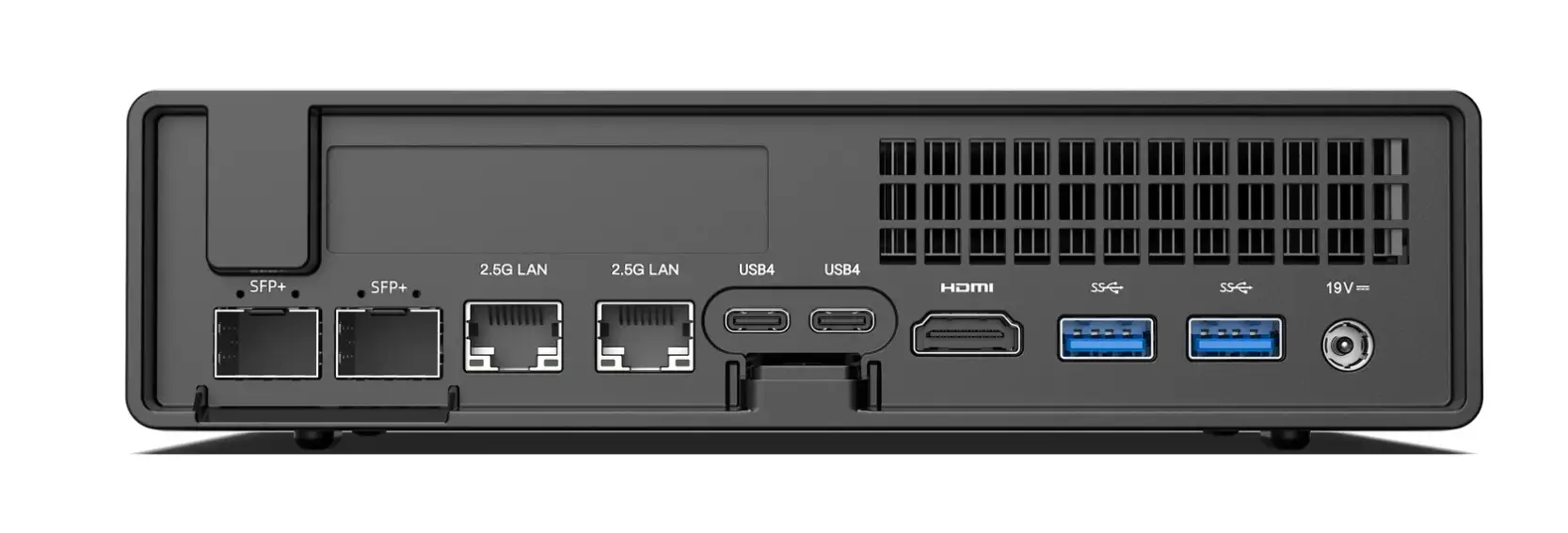
The MS-01 supports popular hypervisors like ESXi and Proxmox, ensuring versatile server management. Its sleek design, advanced connectivity options, and significant expandability make it a top choice for home server enthusiasts.
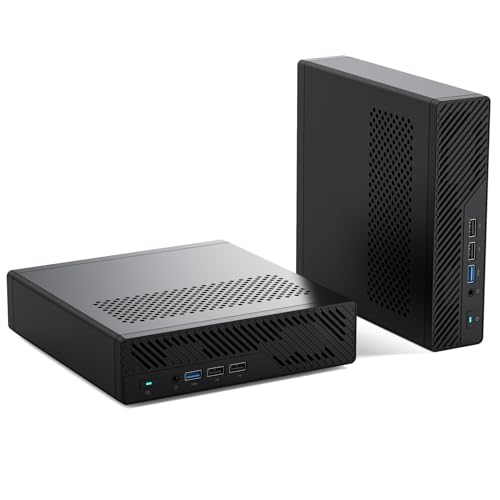
The Misisforum MS-A2 features the same specs; the only difference is that it has an AMD Ryzen processor.

ASUS NUC 15 Pro+ Barebone: The Latest Generation Mini PC (Successor to NUC 14)
The ASUS NUC 15 Pro represents the newest generation of ASUS NUCs. Powered by Intel Core Ultra 7 255H processor with DDR5-6400 memory and Intel Arc graphics, it delivers unmatched speed and efficiency in a compact chassis
Key Features:
- Processor: Intel Core Ultra 7 255H with 16 cores, 16 threads, and up to 96 TOPS of AI performance
- Memory: Dual-channel DDR5-6400 RAM, supports up to 96GB for efficient multitasking and large datasets
- Storage: Dual M.2 slots – one M.2 2280 PCIe 5.0 and one M.2 2242 PCIe 4.0
- Connectivity: Wi-Fi 7 (up to 46Gbps), Bluetooth 5.4, dual Thunderbolt 4 ports, and two HDMI ports supporting quad 4K displays
- Network: 2.5G Ethernet port for reliable wired connections
- Design: Toolless chassis with innovative spring-loaded lever design for easy RAM and storage upgrades
- Cooling: Advanced thermal design ensures quiet operation, ideal for home and office environments
The ASUS NUC 15 Pro is compact yet powerful, designed for virtualization, media servers, and business applications. It works without a physical monitor, perfect for servers and remote management.

HP Pro Mini 400 G9
The HP Pro Mini 400 G9 Business Mini Desktop Computer is a powerful and efficient device with many impressive features. Here are the highlights:
- 6-core Intel i5-12500T 2.0GHz processor with a maximum speed of 4.4GHz
- 16GB DDR4 SO-DIMM memory for lightning-fast performance
- 1TB PCIe SSD for super-fast storage and quick boot times
- Intel UHD 770 integrated graphics for smooth visuals
- Wi-Fi 6E AX211 and Bluetooth 5.3 for seamless connectivity
- RJ-45 Ethernet LAN for reliable wired networking
- 2 Display Port and 1 HDMI 2.1 for multiple display options
- Compact and stylish design with a weight of only 3lbs

Overall, the HP Pro Mini 400 G9 Business Mini Desktop Computer is a great choice for anyone needing a fast, reliable, and compact device for business or personal use.
AceMagic K1 (Ryzen 5 7430U)
Some product highlights
- AMD Ryzen 5 7430U with 6 cores / 12 threads (2.3 GHz base, up to 4.3 GHz boost)
- Up to 64 GB DDR4-3200 across 2 SO-DIMM slots (dual-channel support)
- 512 GB M.2 2280 SSD in typical configs, plus two M.2 slots total (one supports NVMe PCIe 3.0 or SATA, the other is SATA-only)
- Solid port selection: 1x Gigabit Ethernet, Wi-Fi 6, Bluetooth 5.2
- Triple 4K display support via HDMI 2.0, DisplayPort 1.4b, and USB-C
- Plenty of USB: 2x USB-A (10 Gbps) and 4x USB-A (5 Gbps) plus USB-C
The AceMagic K1 is my “surprisingly capable budget Proxmox node”. On paper, it’s a simple, compact mini PC. In practice, the Ryzen 5 7430U has enough CPU headroom for a bunch of containers and a few light VMs.
It ships with Windows 11 Pro, but I wiped it and ran Proxmox VE for homelab testing. With 32 GB RAM and an NVMe boot drive, it feels responsive and stable for self-hosting. The main limitation is networking. You get 1 GbE, not 2.5 GbE. So it’s best for services and lab workloads, not as a high-speed NAS box.


Beelink SER8 Mini-PC
Product Highlights:
- Beelink SER8 Mini-PC with AMD Ryzen 7 8845HS processor
- 8 cores and 16 threads, delivering up to 4.4 GHz speed
- Equipped with 32GB DDR5 RAM and 1TB NVMe SSD for robust performance
- Windows 11 Pro operating system for cutting-edge technology
- Comprehensive connectivity options, including USB 3.2, HDMI, and Wi-Fi 6
- Supports a 4K UHD display for excellent visual clarity
The Beelink SER8 Mini-PC is a compact powerhouse featuring the AMD Ryzen 7 8845HS processor for efficient multitasking and high-speed performance. It has 32GB DDR5 RAM and a 1TB NVMe SSD, ensuring ample storage and fast data access. Operating on Windows 11 Pro provides a seamless user experience with modern features. The mini PC supports 4K UHD display, enhancing video and media streaming quality. With its extensive connectivity options, the Beelink SER8 is an excellent choice for those seeking a high-performance mini PC for home server applications.d it to any tech geeks out there looking for a powerful and versatile mini-computer.

GMKtec G3 Plus Mini PC: Best Budget Option
Looking for an affordable entry into home servers? The GMKtec G3 Plus delivers surprising value for basic server tasks without breaking the bank.
Product Highlights:
- Processor: Intel Twin Lake N150 with 4 cores, 4 threads, and burst speeds up to 3.6GHz, offering 6-10% better performance than the N100 and 15% improvement over the N95
- Memory & Storage: 16GB DDR4 RAM and 512GB PCIe M.2 2280 NVMe SSD, boots in seconds and handles multiple browser tabs efficiently
- Connectivity: Four USB 3.2 ports (up to 5Gbps), dual HDMI 4K@60Hz outputs, WiFi 6, Bluetooth 5.2, and 2.5GbE Ethernet
- Server Compatibility: Compatible with Linux, Proxmox, Ubuntu, and other lightweight server operating systems for basic home server tasks
- Energy Efficiency: Draws approximately 9 watts at idle and up to 25 watts under full load, making it very energy-efficient for 24/7 operation
- Expandability: Easy upgrades with a spare M.2 SSD slot for additional storage
Best For: Light server tasks, file sharing, media streaming, and budget-friendly virtualization. Perfect for students, families, or anyone needing a basic computer for everyday tasks.
Not Ideal For: Heavy virtualization, multiple VMs, or demanding workloads. This is an entry-level option best suited for simple home server projects.
This budget model uses a Realtek network chip, which may not work with VMware ESXi without workarounds. For ESXi compatibility, consider models with Intel NICs, such as the Intel NUC or the Minisforum MS-01.

Someone on Reddit mentioned running the GMKtec K1 successfully on Proxmox with 32GB of RAM.

Lenovo ThinkCentre M90q Gen 5
Some product highlights
- Business-class ThinkCentre Tiny platform, built for 24/7 office use
- Up to 64 GB DDR5 (2 SODIMM slots), great for Proxmox and multiple VMs
- Two M.2 PCIe Gen4 x4 slots for NVMe SSDs, so you can run fast storage without adapters
- PCIe 4.0 low-profile slot for add-ons, which is rare in 1L mini PCs
- Optional tool-less access makes upgrades and maintenance less annoying
The ThinkCentre M90q Gen 5 is my “safe business pick” for anyone who wants a mini server that just runs. It’s a proper enterprise Tiny box, so sourcing, documentation, and long-term reliability are usually better than with many consumer mini PCs. It also gives you real upgrade options: two NVMe slots for fast storage and even a PCIe slot for expansion.
For home labs, this model is a good fit. You can set up a solid Proxmox node with fast NVMe storage and enough RAM for virtual machines. If you want a mini PC that feels business-grade and stays flexible for future upgrades, this is a strong option.

Apple MacMini M4 (honorable mention)
I list the Mac mini M4 only as an honorable mention because it uses Apple Silicon (ARM), so it’s not a great fit for typical x86 home server setups like Proxmox VE (which requires Intel 64 or AMD64). Many virtualization stacks on Apple Silicon run ARM-only guests.
The Apple Mac mini with Apple M4 Chip is a game-changer in the world of technology. Here are some highlights of its features:
- Impressive processing power with Apple M2 chip, 8-core CPU, 10-core GPU, and 16-core Neural Engine
- Built for the new Apple Intelligence
- Thunderbolt 3 ports with support for DisplayPort, Thunderbolt 4, USB 4, USB 3.1 Gen 2, Thunderbolt 2, HDMI, DVI, and VGA
- Two USB-A ports, an HDMI port, a Gigabit Ethernet port, and a 3.5 mm headphone jack
- EPEAT is registered for sustainability
- Highly rated by customers on Amazon

My recommendation for the best Mini -PC Server for Homelab and Small Business
From my experience, I recommend the Minisforum MS-01. This mini PC packs powerful processors, plays nicely with Proxmox, and handles virtualization, media servers, and self-hosted storage with ease. Its efficient design and fair price make it an excellent choice whether you’re running a single server or building a multi-node cluster.
The Acemagic K1 and Beelink SER8 Pro are also fast options for home server tasks. They are not as powerful as the MS-01, but they offer good value for the price.
Check that your mini-PC server works with your operating system. I use Proxmox and VMware on my setups. Proxmox works with almost all hardware, but VMware may require an Intel NIC for compatibility. Setting up a small Proxmox cluster with three nodes is an affordable way to try clustering and get high availability in your home lab.
Please check out my virtualization category blogs.
I’d love to hear from you — was this article helpful? Share your thoughts in the comments below. If you prefer, you can also reach me by email or connect with me on Reddit at Navigatetech.
Before you go …
I want to draw your attention to another insightful blog post of mine. If you found the information on VMware’s USB network adapter helpful, you might also be interested in a comparison I made between Proxmox and ESXi.
This post delves into their respective features, performance, and overall efficiency. Whether you’re trying to decide between the two for your homelab or looking for a more environment-friendly option, this blog post provides a comprehensive analysis that could help you make an informed decision.
Related Articles
About the author
Hi, I’m Edy Werder. I write hands-on guides about Proxmox, homelab servers, NAS, and WordPress, based on real setups I run and document.
No sponsors, no fluff—just real configs and results.
Enjoying the content?